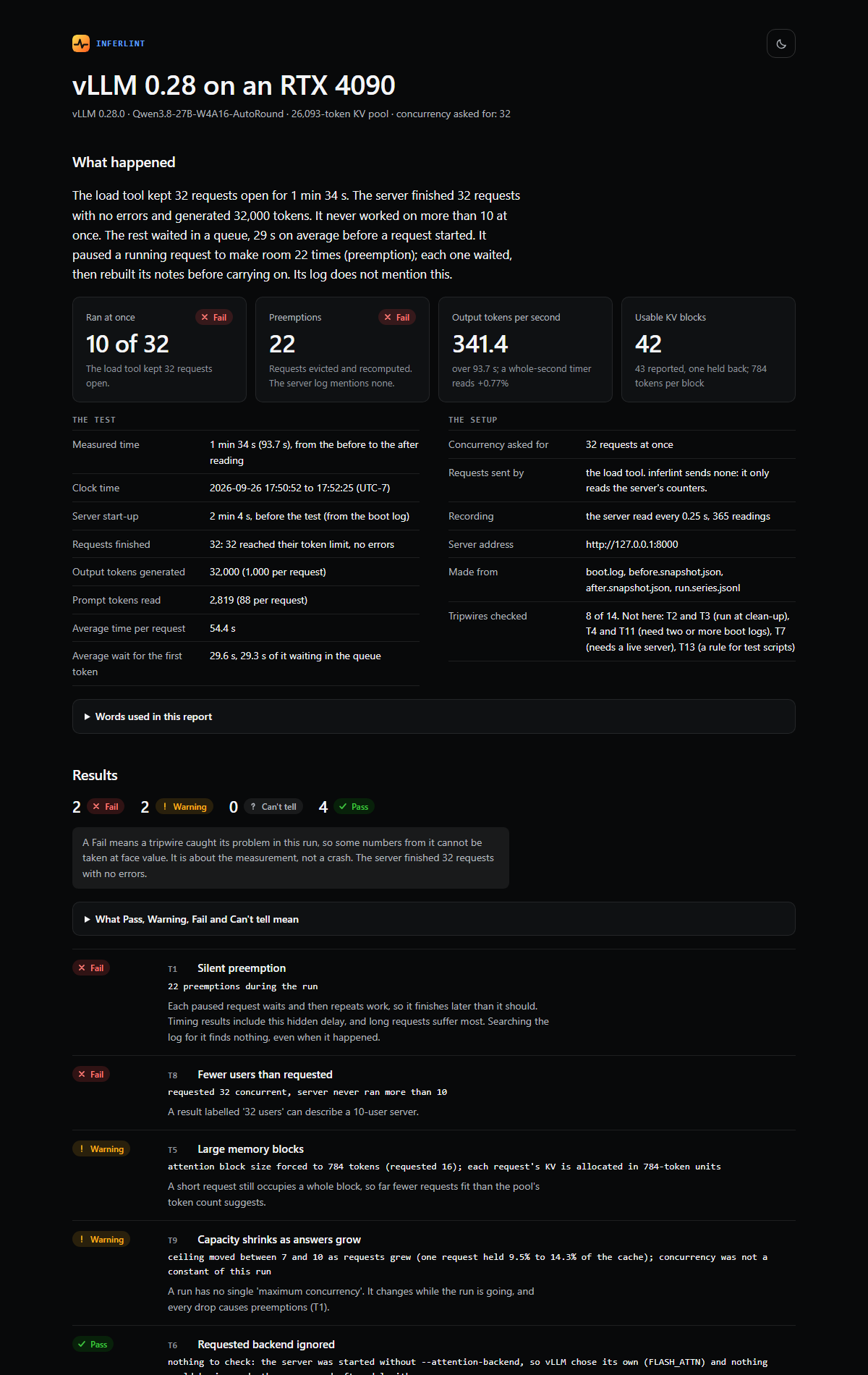
10 of 32
The client held 32 requests in flight. The server never ran more than 10 at once.
Open source · inferlint 0.3.0
inferlint measures what your inference server actually did and flags what it didn’t tell you. It works with vLLM, SGLang and TensorRT-LLM. It runs around the benchmark you already use, reads the server’s boot log, Prometheus metrics and GPU process state, and generates a self-contained report showing achieved concurrency, queueing, KV-cache use, preemptions and teardown.
pipx install inferlint01 · Why it exists
A serving benchmark can be wrong without an error. In one recorded vLLM 0.28 run, the load tool kept 32 requests open and the server completed every one. The headline throughput looked valid. The server-side evidence told a different story.
The client held 32 requests in flight. The server never ran more than 10 at once.
Running requests were preempted 22 times. The server log has no line for any of them.
Errors reported by the benchmark. Without the server counters, the run appeared clean.
Recorded on vLLM 0.28 with Qwen3.8-27B (4-bit weights) on the RTX 4090 GPU family. The same run on vLLM 0.29 and 0.30 gave the same findings. Read the commands and raw evidence, or replay the GPU memory limit in 3D.
02 · Three engines
vLLM preempts a running request and writes no log line; only a counter moves. TensorRT-LLM pauses requests for recompute and counts none. SGLang can lower its running limit at start-up and still report the limit it was given. inferlint tells the engine from the server command, its metrics and its log, and the commands and report work the same way on all three.
| vLLM 0.30 | SGLang 0.5.20 | TensorRT-LLM 1.3.0rc29 | |
|---|---|---|---|
| KV pool | 32,336 tokens (47,888 on a second start) | 32,096 tokens | 37,760 tokens |
| Most running at once (T8) | 32 | 29 | 32 |
| Preempted (T1) | 3 preemptions, no log line | 0 retractions | 0 pauses in its log |
| Output tokens per second | 1,274 | 799 | 1,389 |
| Client and server counts (T15) | agree | agree | agree |
The benchmark path matters. With vllm bench serve sending the same load to all three engines, SGLang ran up to 29 requests at once and produced 799 output tokens/s. With SGLang’s own client using its native /generate endpoint, the same server ran all 32 requests and produced 1,337–1,342 output tokens/s. Run details →
03 · One command
inferlint xray wraps a whole benchmark run. Your load tool sends the requests and measures speed; inferlint reads the server side and says which of those numbers hold. It always stops the server at the end, also after a failure or Ctrl-C.
Check that the GPU is free, start the server from the --serve command and save its boot log, then send 9 probe requests to catch a configuration that starts but fails on its first request.
Snapshot the server’s counters before and after the load command, and record its gauges while the load runs. With each engine’s own benchmark client, xray saves the client’s result so its counts can be compared with the server’s.
Run every tripwire that applies, say what limited the run, write report.html and results.json, and stop every server process. Exit status 1 fails automation on a broken measurement.
CHECK YOUR OWN RUN
inferlint xray -o run/ --serve "vllm serve MODEL --max-model-len 16384" \
    -- vllm bench serve --model MODEL --dataset-name random --random-input-len 88 \
       --random-output-len 1000 --ignore-eos --num-prompts 32 --max-concurrency 32
SGLang serves metrics only with --enable-metrics; TensorRT-LLM needs return_perf_metrics: true and enable_iter_perf_stats: true in its --config file. xray names the missing setting before it runs the load. A team on one engine can set INFERLINT_ENGINE (or --engine), and inputs from another engine are then refused. inferlint report run/ checks a saved run folder again, on any computer. Commands for all three engines.
04 · The report
inferlint generates a report with an opening summary of what limited the run: whether the KV cache could hold the load at full length, whether requests waited to start, and how close throughput came to the limit implied by per-token speed. It calculates each finding from the measurements included in the report.
A failed tripwire reads “Tripwire failed”: the check caught its problem. For T7 and T12 the server failed; for every other tripwire the server worked, but a number from the run does not mean what it seems.
05 · Fifteen tripwires
Each check names one condition that can change a benchmark result without producing a useful error. The finding includes the evidence behind it and the command that reproduces it. A tripwire about a behaviour an engine does not have says so instead of being left out.
Detect silent preemption, compare requested with achieved concurrency, follow a capacity ceiling that falls as answers grow, and expose whole-second timing error.
Read KV-pool size and block geometry, confirm the attention backend, compare capacity between starts, name the cause of a failed start, and catch configurations that start but fail on their first request.
Find engine processes that outlive the API server, avoid cleanup commands that kill their own shell, and keep one campaign’s waiter from adopting the next server.
Check whether vLLM’s KV-usage gauge counts every reported block (43 exported, counted in 42nds on the recorded run), and compare the load tool’s counts with the server’s. Extra work on the server means other traffic shared it.
Read all fifteen tripwires, including symptoms, evidence, reproduction commands and what differs on each engine. inferlint explain T9 prints the same in the terminal.
06 · Install
pipx gives inferlint an environment of its own and puts the command on your PATH. The separate commands (gpu-inspect, check-log, probe, snapshot, watch, report, teardown) remain for scripts that control each step.
INSTALL
pipx install inferlint
inferlint --help
uv tool install inferlint does the same. Use pip install inferlint when importing it as a Python library.
07 · Current scope
inferlint is in alpha. The current boundary is explicit so a missing check is not mistaken for a clean run. A boot log from an untested release prints a warning, since log lines and metric names change between releases.
Tested live on the RTX 4090 GPU family (WSL2): vLLM 0.28, 0.29 and 0.30; SGLang 0.5.20; TensorRT-LLM 1.3.0rc29 (a release candidate).
Python 3.10+, no package dependencies. Process inspection and xray --serve require Linux or WSL.
Checks one benchmark run at a time. It is not long-running server monitoring.
Apache License 2.0. Source, tests, recorded fixtures for all three engines, and documentation are public.
inferlint
Things your inference server doesn’t tell you, turned into checks.